This article highlights how surveys within mortgage CRMs provide valuable feedback to enhance client satisfaction and refine services. It explains how to design effective surveys and integrate responses into decision-making. By utilizing CRM surveys, mortgage professionals can build stronger relationships and improve their offerings.
Mortgage CRM Surveys can be a powerful tool to improving the performance of your messaging and engagement with potential and past borrowers.
Here are a few ways in which you can use mortgage crm surveys and unleash their power onto your business.
*Update: You can now share your surveys, reviews and testimonials collected from BNTouch directly to your social media profiles. Click here to learn more.
How Can You Use Mortgage Surveys?
There are many ways to use surveys in your mortgage business. Start by sending a survey to your past borrowers to collect testimonials that can be used on your website & social. Though you can also use them to study your teams performance and learn more about your leads.
Collect Testimonials
Send a survey to your past borrowers to collect a bulk of testimonials. Testimonials can be used on your website, social media pages and other marketing efforts for even more credibility. These testimonials are incredibly valuable. Try adding one to your email signature or in marketing emails. If we read the reviews before buying a $20 laptop mouse on Amazon. Then you bet we’ll want to read some reviews before we move forward with a mortgage professional or loan officer! Use mortgage crm survey’s to collect testimonials and close more loans.
Improve Client Satisfaction
Setup a survey to be automatically sent once the loan process is completed. Use this survey to find out how you did post transaction in your borrowers eyes. This can supply you with valuable insight into how better to serve your clients. Make sure you listen to this feed back though, if taken to heart implemented feedback can lead to more referrals.
Study Your Team’s Performance
A post transaction survey can collect data on how your team has performed monthly, quarterly or after each mortgage. Therefore when you accumulate the info from a months worth of surveys sent to all borrowers your team has worked with you’ll be able to see which team member is providing the most value to your borrowers. A simple “how would you rate your interaction with us” on a one to ten scale can give your team monthly average performance scores that can be used to reward top performers.
Learn More About Your Leads & Borrowers
Use surveys to gauge how your leads or borrowers feel about specific marketing campaigns, tactics or strategies you’ve employed. Ran a new campaign to a new demographic? Ask them how they like the campaign and if they find value in it with a survey. Add another open ended questions to your mortgage crm surveys like “what did you like or not like about this campaign” to get specific recommendations about what your borrowers want to see.
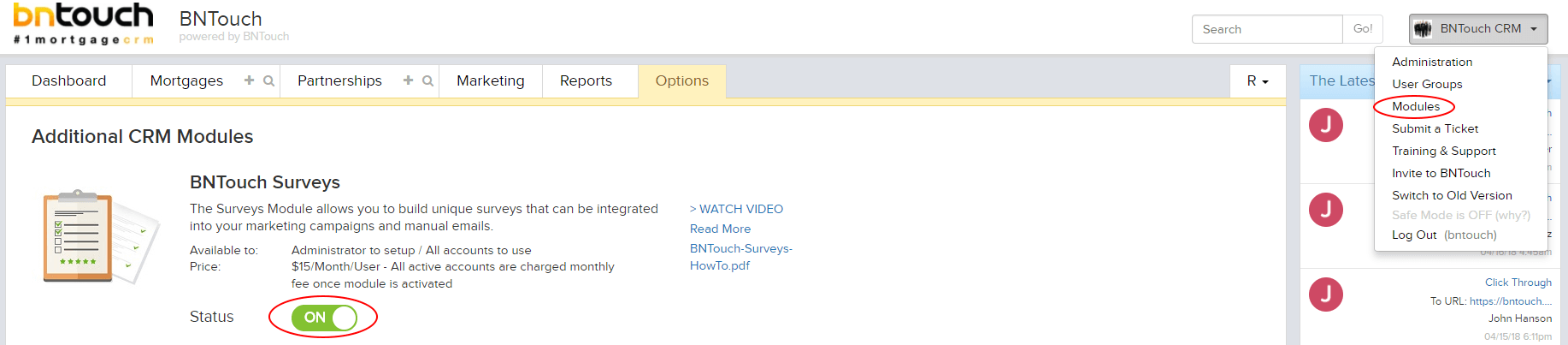
First of all this can easily be done through the modules section on your account.
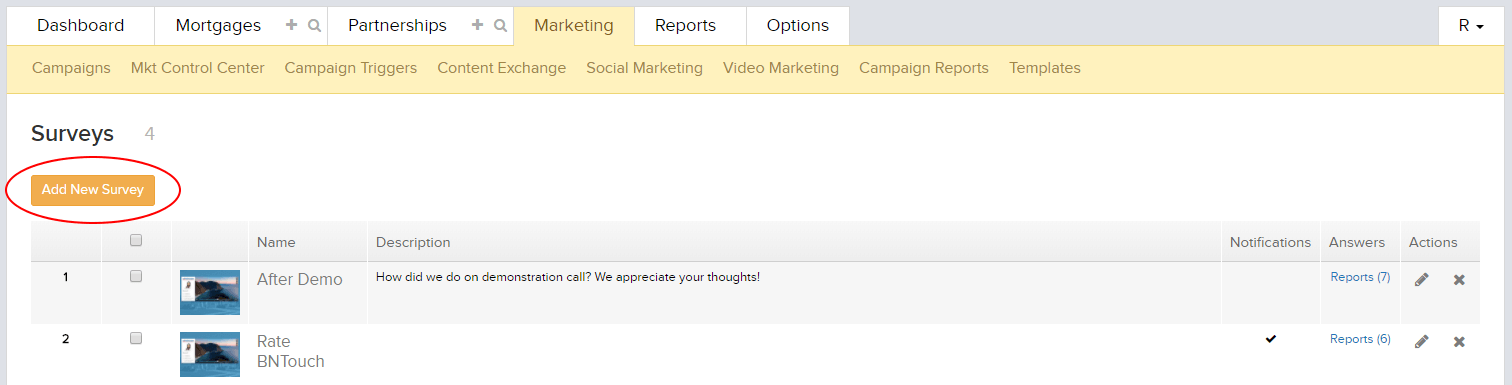
Create New Survey
From you’re newly added survey section (within the Marketing tab) you’ll be able to easily view, edit and remove your current surveys along with add new ones.
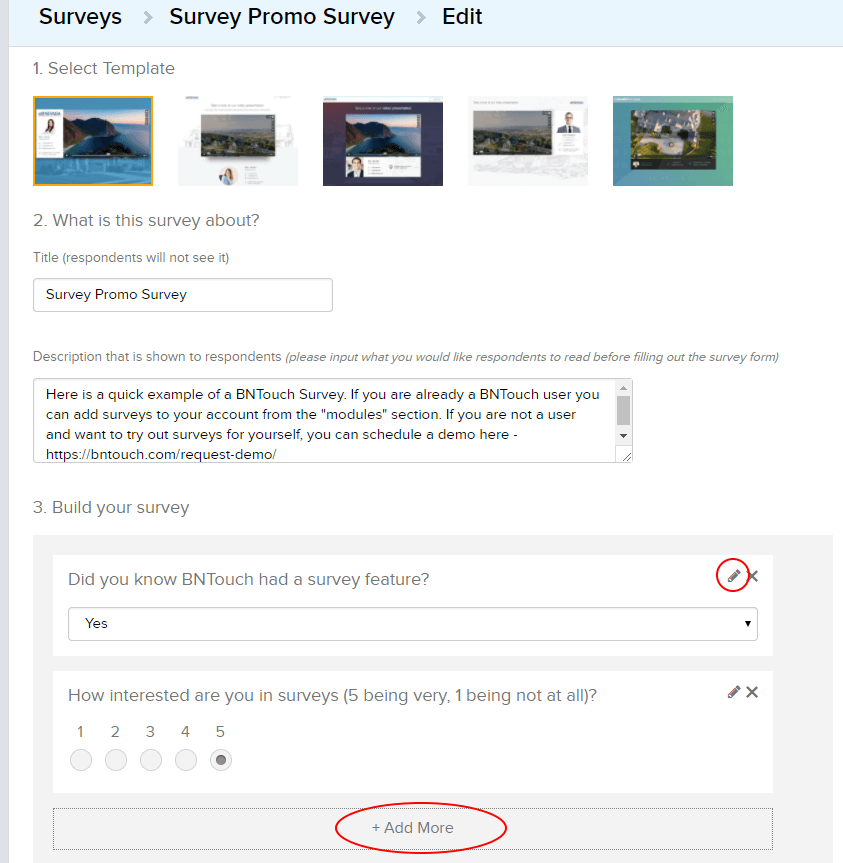
Add Survey Questions
Creating surveys is as simple as choosing your template, naming it, adding your questions and hitting save. Due to changing business needs, all surveys and questions can be edited and revised after they are created.
Apply Survey To Campaign
Finally you can add any finished surveys to your marketing campaigns or communications with the click of a button.
Key Takeaways
Use surveys to understand client needs.
Regular surveys help you gather valuable feedback, ensuring you address client expectations effectively.
Improve client relationships with personalized insights.
Analyzing survey results enables you to tailor your services and improve client satisfaction.
Boost lead generation through post-survey follow-ups.
Engaging with survey respondents helps convert leads into loyal clients.
Commonly Asked Questions
What is the purpose of using CRM surveys in the mortgage industry?
CRM surveys help mortgage professionals gather feedback from clients to improve services and better understand customer satisfaction. By using surveys, lenders can identify areas for improvement, enhance customer relations, and adjust their business strategies accordingly.
How can CRM surveys benefit customer retention?
CRM surveys allow mortgage professionals to stay in touch with clients, gaining insights into their experiences and expectations. Addressing concerns or suggestions from clients through surveys can help increase satisfaction, build loyalty, and ultimately improve client retention.
What are some best practices for conducting CRM surveys in the mortgage business?
Best practices include keeping surveys short and to the point, asking clear and actionable questions, and following up with clients after they complete the survey. Mortgage professionals should also analyze the responses to identify patterns and make data-driven decisions for improvement.
How does using CRM surveys enhance marketing efforts for mortgage professionals?
CRM surveys can help mortgage professionals segment their customer base, allowing them to tailor marketing campaigns more effectively. Understanding client preferences and pain points enables them to craft targeted messaging that resonates with their audience and increases engagement.