


Will AI Replace Loan Officers?
Hell No! AI doesn’t replace loan officers - it makes them more powerful! AI can automate repetitive mortgage workflows, generate mortgage content in seconds, provide smart marketing and sales recommendations, guide clients through application process and chat with website visitors.





Try MAIA NextStep: AI That Advises Your Next Move
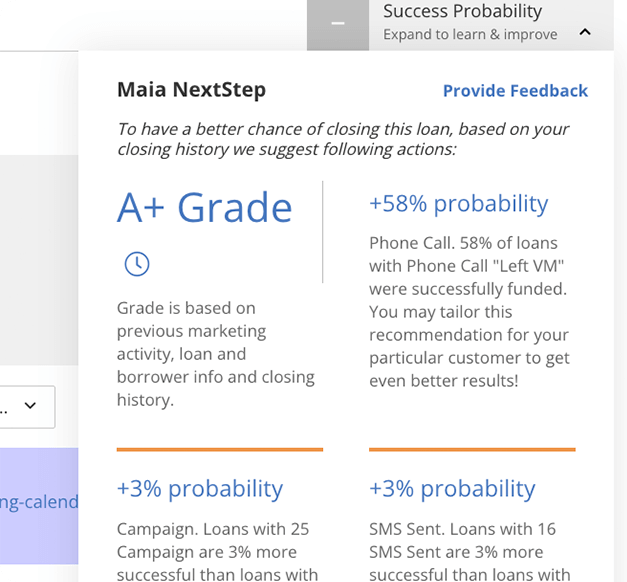
MAIA NextStep analyzes loan data and past performance to identify high-priority opportunities in real time. It grades leads, updates mortgage records every hour, and provides actionable marketing recommendations to accelerate closings. Detailed performance reports track key metrics like Days to Close, so you always know where to focus. Turn leads into loans with AI.
-
 Loan grading
Get insights into a lead’s potential for closing
Loan grading
Get insights into a lead’s potential for closing
-
 Real-time updates
Mortgage records analyzed every hour
Real-time updates
Mortgage records analyzed every hour
-
 Actionable recommendations
Marketing recommendations to close loans faster & more efficiently
Actionable recommendations
Marketing recommendations to close loans faster & more efficiently
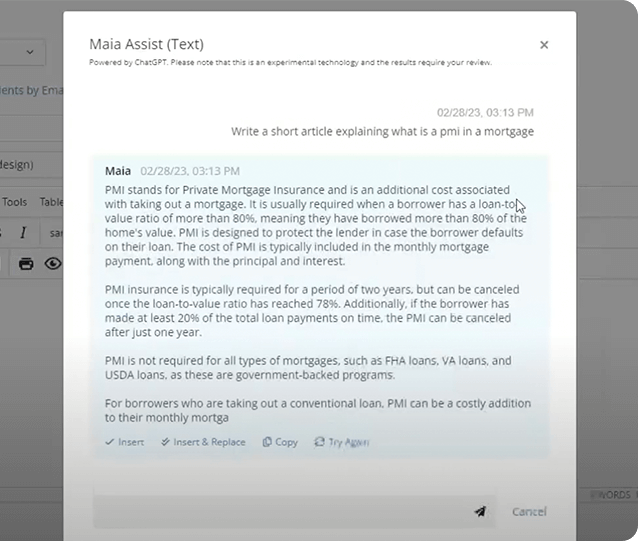
AI-Powered Content Creation - Marketing, Made Effortless
Writing emails, SMS, and creating campaigns is easier with BNTouch’s AI-powered content generator. Create professional mortgage marketing emails and texts in seconds using our integrated ChatGPT tool. Generate AI images directly in your email editor and tailor every message to where your clients are.
-
 Generate custom marketing emails
with a simple prompt
Generate custom marketing emails
with a simple prompt
-
 Create AI-generated images
right inside your email editor
Create AI-generated images
right inside your email editor
-
 Personalize every message
to match your brand and audience
Personalize every message
to match your brand and audience
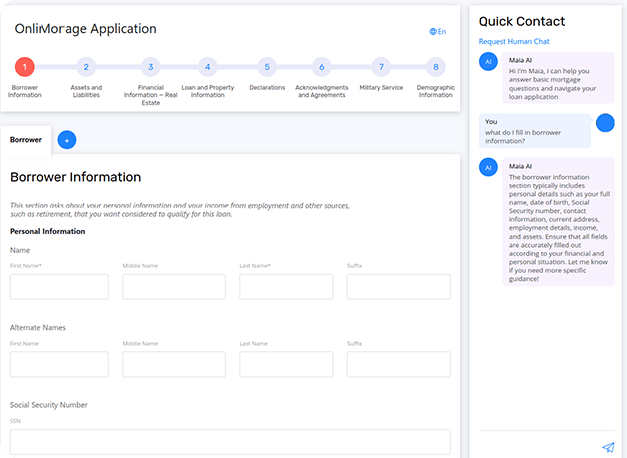
BNTouch MAIA AI-Guided 1003 Form Fill
BNTouch’s AI transforms the 1003 form process by guiding you through every field. With real-time assistance from the MAIA chat window, complete the form quickly and accurately. Enjoy instant help, error-free navigation, and detailed tips at every step - speed up your 1003 process with MAIA.
-
 Instant assistance
Get help with specific form fields as you go.
Instant assistance
Get help with specific form fields as you go.
-
 Accurate completion
Detailed tips to fill out the form correctly every time.
Accurate completion
Detailed tips to fill out the form correctly every time.
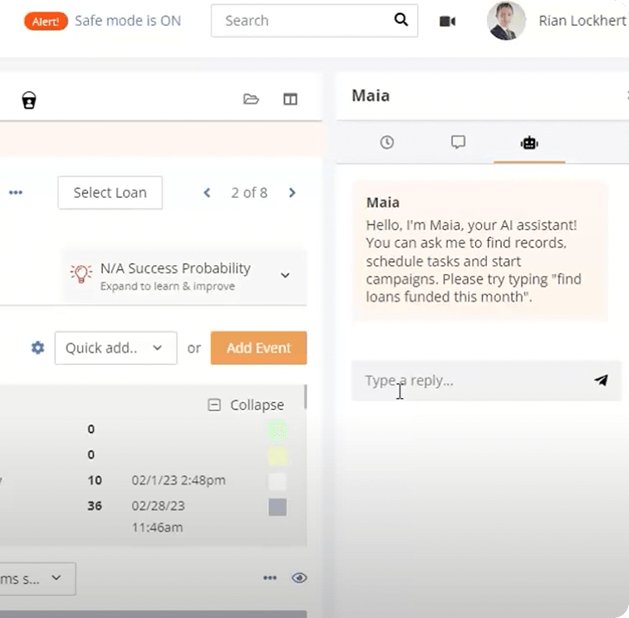
Meet MAIA: Your 24/7 Mortgage Assistant
MAIA is more than a tool - she’s your AI-powered assistant built into BNTouch CRM. Using natural language, she simplifies complex tasks so you can find files instantly, automate daily tasks like setting reminders, scheduling calls and sending SMS, and access key reports in seconds. Whether you’re at your desk or on your phone, MAIA is always ready to help you navigate your CRM, manage appointments and deadlines, and boost productivity - AI that works like a team member.
-
 Find files instantly
No more endless searches
Find files instantly
No more endless searches
-
 Automate daily tasks
Set reminders, schedule calls, send SMS
Automate daily tasks
Set reminders, schedule calls, send SMS
-
 Reports & insights
Get key data in seconds
Reports & insights
Get key data in seconds
AI Is Reshaping the Mortgage Industry - Will You Keep Up?
Stay ahead of the curve. BNTouch’s AI tools empower you to close more deals by efficiently managing data and personalizing client interactions. Rather than replacing loan officers, our AI scales your operations, automates workflows, and makes your role even more valuable. Work smarter, close faster, and grow bigger.
See a Live DemoBuilt only for mortgage since 2004.
Plans start at $95 per user per month, plus a one-time activation fee that covers your onboarding. See it in 30 minutes and leave with pricing for your setup.
Book a Live Demo