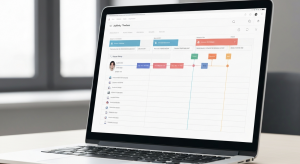
Mortgage Circles is the BNTouch mobile app for realtors and partner contacts. Once a partner is invited to a partner portal and downloads Mortgage Circles, they get a mobile dashboard showing their participated transactions with your LO, a messages view that pulls in tracker updates and LO conversations, a new-lead submission form they can fire from their phone, and a property site builder that lets them spin up co-branded landing pages for individual listings. The my-info page lets them control their contact information, profile photo, and company logo used across all the co-branded marketing the LO sends.
Direct framing from the walkthrough: “Your partner portal is an easy secure way to coordinate with your loan officer and showcase property sites. When you log into Mortgage Circles, you’ll be able to communicate with your loan officer, review transactions you are [participating in]” [Y8AEZTDJAM4 m0]. So the partner experience is built around three jobs: communication, transaction review, and lead/property creation.
The dashboard: participated transactions at a glance
“The first page you will see upon logging into Mortgage Circles is the dashboard. This screen will give you a brief overview of your participated transactions. At the top of your dashboard you can swipe side to side to navigate between [transactions]” [Y8AEZTDJAM4 m1].
So a realtor with three active buyers working with you sees all three transactions on their dashboard. They swipe between cards to check status on each. No more “what’s the update on the Johnson file?” texts at 9pm; the partner can see the status themselves.
The navigation menu
The mobile pattern matches what realtors expect from any modern app. “In the upper left corner of your screen, you can tap the icon to access the navigation menu for your portal. You can see the various options available by swiping up and down, and you can tap any link to open a page” [Y8AEZTDJAM4 m2]. Standard hamburger menu. Pages include the dashboard, messages, lead submission, property sites, and my info.
The messages page (events plus LO conversations)
The messages screen is more than email. “The my messages page will show all events that are relevant to your mortgage clients you are helping with, including tracker updates for participated records, and messages between you and the loan officer” [Y8AEZTDJAM4 m3].
So the messages view combines two streams: tracker updates from the borrower’s file (e.g., “borrower completed 1003” or “appraisal ordered”) and the direct conversation between the realtor and the loan officer. Both surface in the same view, ordered by recency. The realtor sees what is happening on the file without bothering the LO for updates.
The lead submission form (the under-used feature)
One feature that very few real estate partners know about until you show them. “[A] simple way to send new lead information to your loan officer. Here you can put client data in the form fields, add any comments for your loan officer below, and tap send information. This will transmit the new lead data to your loan officer” [Y8AEZTDJAM4 m4].
So the partner can submit a new lead from their phone in 30 seconds. They are at a showing. The buyer asks about financing. The realtor opens Mortgage Circles, taps lead submission, fills in the buyer’s name, phone, email, target price, comments, and hits send. The lead lands in BNTouch on the LO side instantly, with partner attribution captured. The LO can call the buyer within minutes of the showing ending.
This eliminates the friction in the “I’ll send my LO their info later” workflow that loses most leads. The realtor sends from the phone, the LO calls fast, the lead converts.
Property sites: co-branded listing landing pages
The property sites feature inside Mortgage Circles lets the partner spin up a co-branded landing page for a specific listing. “Next you can choose from five different open house templates to customize the look. Below you can tap the modify fields button to configure which data fields will appear on the form” [Y8AEZTDJAM4 m5].
So the realtor picks a template (open house variant), configures the fields, adds a brief sales pitch: “Add a brief sales pitch to appear on the site. When you tap next below, a new page will be created specifically for that property” [Y8AEZTDJAM4 m6].
The page is automatically co-branded with both the realtor and the loan officer (the borrower sees that the listing is being sold by realtor X and that the buyer is pre-approved through loan officer Y). When a prospect fills out the open house form on the property site, the lead flows back to both the realtor and the LO at the same time.
“When editing a property site you can swipe between [the editing screens]. [Use the] preview site button below to see what the page will look like with all the information you’ve entered” [Y8AEZTDJAM4 m7]. The preview button is the right discipline; check the page before sharing the link.
The my-info page: contact info and branding
“You can use the my info page to customize your contact information used in all communication via the partner portal. Here you can upload a profile and company picture” [Y8AEZTDJAM4 m7].
So the partner controls their own contact details and branding. The profile photo and company logo they upload appear on every co-branded campaign the LO sends out, every property site they spin up, and every communication that goes through the portal. This is how the brokerage and the realtor stay visually consistent without anyone manually re-uploading assets.
A specific scenario: Saturday showing into Monday close
A realtor partner has a Saturday afternoon showing on a new listing. The buyer is interested but hesitant about financing. With Mortgage Circles:
Saturday 2:15pm: Realtor finishes showing. Buyer says “I am interested but not sure about the financing side.” Realtor opens Mortgage Circles, taps lead submission, enters buyer’s name, phone, email, target price $475K, and adds a comment: “buyer hesitant about rates, please call within the hour.” Hits send.
Saturday 2:23pm: Lead lands in BNTouch on the LO side with partner attribution. LO’s mobile app notifies them. LO calls buyer within 8 minutes of submission.
Saturday 3:15pm: Buyer is calmer. LO sends a pre-approval letter for $475K through BNTouch. Buyer receives it on their phone.
Sunday morning: Realtor follows up, submits an offer. Pre-approval is already on hand.
Monday morning: Offer accepted. Realtor sees the dashboard update on Mortgage Circles confirming the new status.
Total elapsed time from buyer hesitation to accepted offer: 48 hours. Speed-to-contact on the lead: 8 minutes. Without the Mortgage Circles lead submission, the realtor would have remembered to send the buyer’s info to the LO on Monday morning, and the buyer would have called a different lender on Sunday.
Honest limits
Partner needs to download the app and accept the invite. Not every realtor will. For realtors who refuse to install an app, the desktop partner portal accomplishes most of the same jobs at a slightly slower pace.
Property sites pull from MLS data on file. If the property is not properly added to BNTouch or pulled via MLS, the property site has to be configured manually.
Lead submission inherits the LO’s lead-routing rules. If the LO has a round-robin or geo-based routing set up, the submitted lead routes per that rule. The realtor cannot override routing from the app.
Profile assets sync to portal but not to MLS or external systems. The realtor’s branding on Mortgage Circles is for portal use only; it does not push to their MLS profile, brokerage site, or social platforms.
Show this to your top realtor partners
To demo Mortgage Circles to a realtor partner who would benefit from mobile lead submission and property site creation, request a demo and ask the BNTouch team for the partner-facing walkthrough script. The partner portal page covers the desktop partner portal feature set.